
SDK + Hardware Kit (HDK) · Private Beta
Yarbo Open Platform Documentation
Build custom yard automations, home dashboards, field robotics workflows, and purpose-built attachments with Yarbo’s SDK and Hardware Kit (HDK).
1. Overview & Platform Architecture
The Yarbo Open Platform combines software SDK interfaces, an isolated on-robot sandbox, and Hardware Kit (HDK) mechanical/electrical specs—all mediated by a non-bypassable safety supervisor:
Off-robot scripts, dashboards, automations & AI agents with owner consent.
CPU & memory-capped sandbox—crash-isolated from core motion control.
Centimeter RTK, wheel/IMU odometry, stereo vision & heavy-duty drive.
3D CAD flange, switched power rail, isolated CANopen & Ethernet.
- Personal & Lab Direct SDK (
YarboAccount): Sign in with your own Yarbo account in memory to inspect status, manage maps and schedules, or run bounded local automations on your bound robots. - Authorized Partner Apps (OAuth 2.0 Device Flow): Multi-user tools request scoped, short-lived tokens approved by the robot owner—passwords are never shared with third-party applications, and owners can revoke access at any time.
- Crash-Isolated On-Robot Sandbox (Project Pilot): Edge pilot apps run inside a CPU/memory-bounded sandbox isolated from core motion control—even if custom code crashes or stalls, the Core Safety Supervisor and hardwired E-Stop chain remain in full control.
- Explicit & Conservative by Design: Missing or unseen telemetry fields stay
None(never silently filled with zeros), configuration edits support zero-write previews (preview_*) and readback verification (result.verified), and motion commands are strictly bounded in speed and duration.
2. Quickstart
Approved Beta developers receive the yarbo-sdk wheel package and Developer Console access. Once installed in Python 3.11+, you can connect and read your first live robot snapshot in a few lines:
# Install the Beta wheel with account & TLS transport extras
python -m pip install "yarbo_sdk-0.2.0-py3-none-any.whl[account]"
import os
from yarbo_sdk import YarboAccount
with YarboAccount() as account:
account.login(os.environ["YARBO_EMAIL"], os.environ["YARBO_PASSWORD"])
devices = account.devices()
robot = account.robot(devices[0].device_id)
snap = robot.status()
print("Robot:", devices[0].nickname or devices[0].device_id)
print("Battery (%):", snap.value("/BatteryMSG/capacity"))
print("RTK status:", snap.value("/RTKMSG/status"))Don’t have a robot handy yet? The SDK also includes ReadOnlyClient for replaying recorded JSONL telemetry offline without network credentials.
3. Reading Status & Capabilities
robot.status(timeout=10) performs an explicit one-shot status query and returns an immutable Snapshot. Every field retains its local receive timestamp so your code can distinguish fresh readings from stale or unseen values:
snap = robot.status(timeout=10)

battery = snap.reading("/BatteryMSG/capacity")
if battery is not None:
    print(f"Battery: {battery.value}% (received {battery.age():.1f}s ago)")

# Inspect active head module & SDK capability match
caps = robot.read_capabilities(timeout=10)
print("Observed head:", caps.head_observation)
For continuous dashboards, account.reader(device_id) opens a passive TLS subscription that merges incoming status updates into a local snapshot without publishing commands to the robot:
with account.reader(device_id) as reader:
    reader.start(timeout=10)
    latest = reader.client.snapshot()
    print("Seen fields:", len(latest.fields))
4. Maps, Plans & Schedules
Read yard zones, pathways, no-go areas, work plans, and time schedules—or preview changes offline before saving with automatic readback verification:
# List saved lawn/snow areas, plans, and recurring schedules
areas = robot.maps.list("area") or ()
plans = robot.plans.list()
schedules = robot.schedules.list()

for plan in plans:
    print(plan.id, plan.name, "zones:", plan.area_ids)

# Preview enabling a schedule (reads current state, writes nothing)
preview = robot.schedules.preview_enabled(schedule_id=1, enabled=True)
print("Preview diff:", preview)

# Apply with baseline conflict check + readback verification
result = robot.schedules.set_enabled(schedule_id=1, enabled=True)
if result.status == "verified":
    print("Schedule updated and verified on robot")
5. Guarded Task & Motion Control
Task lifecycle commands and short-range movement methods validate session ownership, module state, and safety flags before sending:
import threading

# 1. Start, pause, or send the robot back to its charging dock
preview = robot.preview_start_plan(plan_id=1, percent=0)
robot.start_plan(plan_id=1, percent=0, timeout=10)
# robot.pause_plan() / robot.resume_plan() / robot.recharge()

# 2. Short-range closed-loop drive for GPS-denied garages (bounded ±10 m, ≤ 0.4 m/s)
cancel = threading.Event()
robot.undock(timeout=10)
drive_res = robot.drive_odom(
    3.0,
    speed_m_s=0.2,
    tolerance_m=0.1,
    cancel=cancel,
    timeout=10,
)
print("Outcome:", drive_res.termination, "Travelled (m):", drive_res.distance_travelled)
drive_odom monitors wheel/IMU odometry freshness and hardware stop flags continuously, sending a zero-velocity stop frame automatically upon arrival, cancellation, timeout, or any safety interlock.
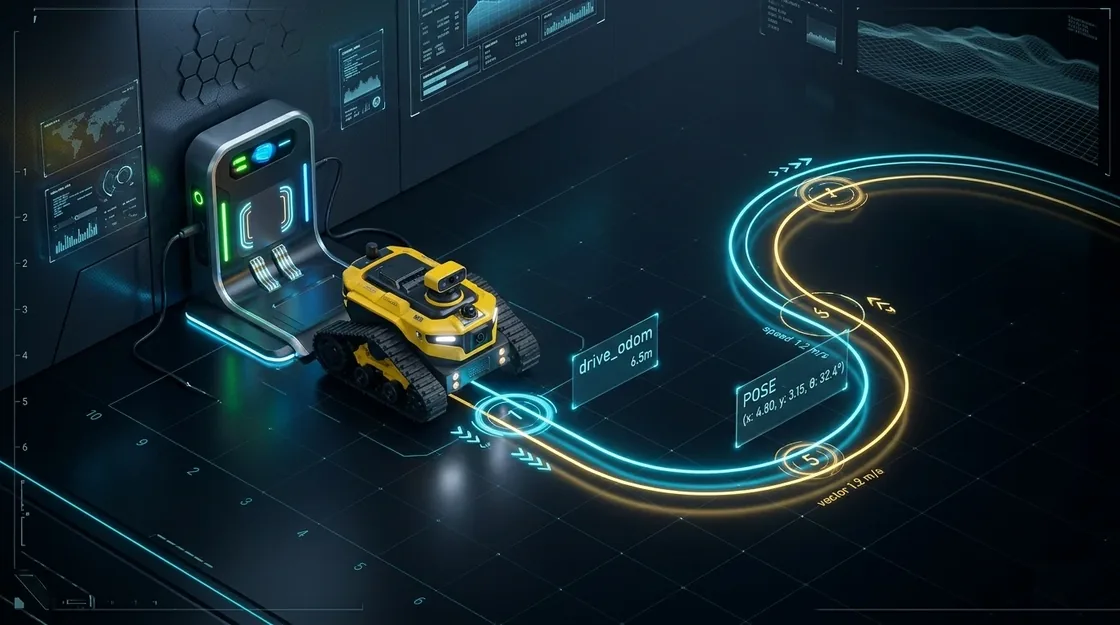
drive_odom) for exiting and entering GPS-denied garages.6. AI Assistants (MCP Server)
The SDK ships with yarbo-mcp, a zero-dependency Model Context Protocol (MCP) server over stdio for Claude Code, Claude Desktop, Cursor, and compatible AI coding agents:
# Option A: Register in Claude Code with one command (read-only mode)
claude mcp add yarbo -e YARBO_EMAIL=you@example.com -e YARBO_PASSWORD="***" -- yarbo-mcp --read-only
// Option B: Add to claude_desktop_config.json or project .mcp.json
{
"mcpServers": {
"yarbo": {
"command": "yarbo-mcp",
"args": ["--read-only"],
"env": {
"YARBO_EMAIL": "you@example.com",
"YARBO_PASSWORD": "your-yarbo-password"
}
}
}
}Once connected, your AI agent can inspect live telemetry, preview schedule edits, and run bounded actions with built-in confirmation gates:
# Example prompts in Claude Code / Claude Desktop:
"Check my Yarbo's battery level, RTK fix status, and attached head module."
  → calls yarbo_list_robots, yarbo_get_status, yarbo_read_capabilities

"Preview enabling schedule #1 for weekday mornings without saving yet."
  → calls yarbo_update_schedule(schedule_id=1, enabled=true, preview_only=true)

"Looks good — apply that schedule update now."
→ calls yarbo_update_schedule(schedule_id=1, enabled=true, confirm=true)- 6 Read-Only Inspection Tools (
--read-only/YARBO_MCP_READ_ONLY=1):yarbo_list_robots,yarbo_get_status,yarbo_read_capabilities,yarbo_read_maps,yarbo_list_plans, andyarbo_list_schedules. - 4 Readback-Verified Configuration Tools:
yarbo_rename_map_object,yarbo_rename_plan,yarbo_update_schedule, andyarbo_update_job_param(supports zero-writepreview_only=true; saving requiresconfirm=true). - 3 Guarded Control Tools:
yarbo_control_robot,yarbo_drive_odom, andyarbo_run_module—disabled automatically in--read-onlymode and strictly gated byconfirm=true.
7. Hardware Kit (HDK) & On-Robot Apps
Beyond cloud and local SDK integrations, Yarbo’s modular core opens its Hardware Kit (HDK) for custom attachments and low-latency edge integrations (available to approved project pilots):
- Quick-Swap Mechanical Mount: 3D CAD flange reference models for building custom yard, agricultural, or research payloads on the tracked chassis.
- Power & Communication Bus: Switched power rail, isolated CAN bus, Ethernet, linear push-rod actuation, and hardwired E-Stop safety interlocks.
- Isolated On-Robot Linux Environment: Supervised container runtime on the robot for low-latency stereo camera snapshots and local waypoint tracking.
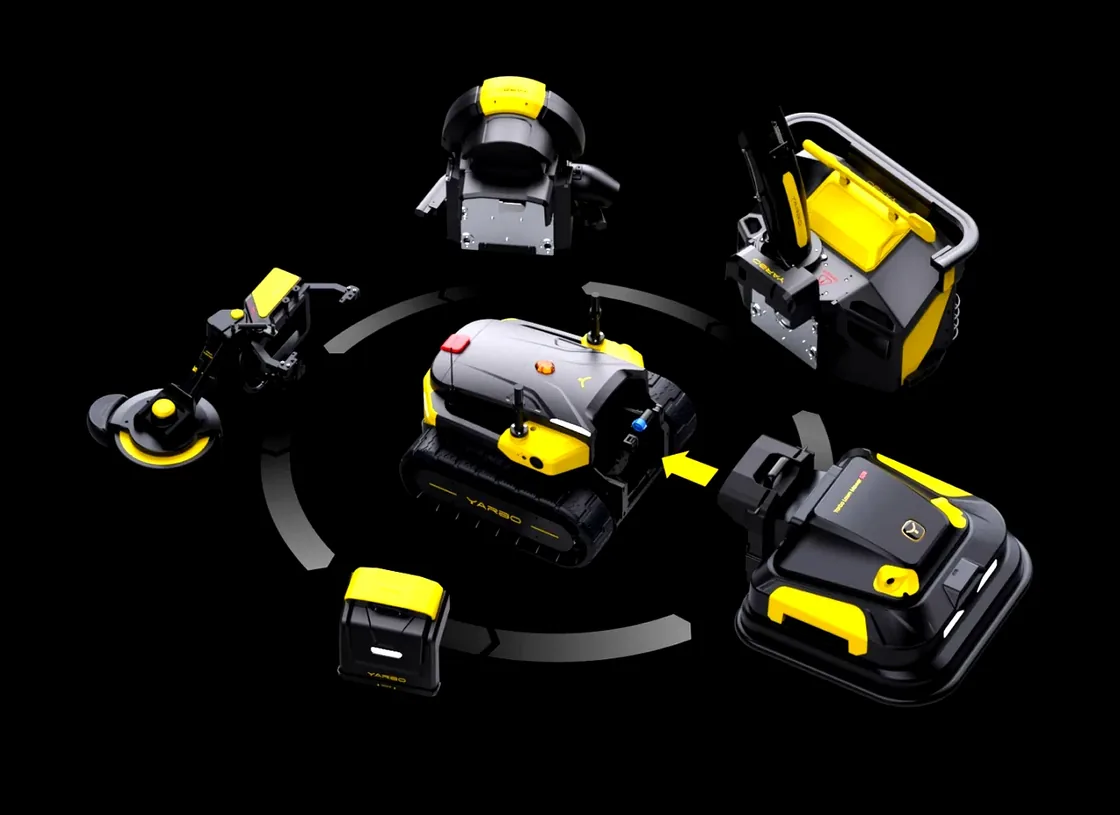
Detailed mechanical CAD files, connector pinouts, and protocol dictionaries are available inside the Developer Console once your Beta application is approved.
8. License & Beta Access
SDK source code is provided under the PolyForm Noncommercial License 1.0.0 for personal learning, academic research, and non-commercial development, subject to the Yarbo Data SDK Terms of Use (V1.1). Commercial products, dealer fleet operations, and third-party distribution require a separate written license from Yarbo (software@yarbo.com).
Ready to build on Yarbo?
Apply for the private beta to receive SDK access, Hardware Kit (HDK) CAD & bus specs, and sandbox credentials.