Yarbo Open Platform · Developer Guide
Full reference for the Python SDK (telemetry, maps, schedules, closed-loop odometry drive), OAuth 2.0 Device Flow, hardware-interlocked actuation APIs, On-Robot Linux Edge Sandboxes, and HDK v1.0 Hardware Attachment specifications.
1. Platform Overview & Dual Access Modes
Yarbo turns all-terrain modular yard robots into a programmable software and hardware robotics base with two complementary integration modes:
- Mode A · Authorized Partner Apps & Plugins (OAuth 2.0 Device Flow + Short-Lived Tickets): Designed for multi-user dashboards, smart-home bridges, and marketplace plugins. Robot owners sign in exclusively on Yarbo’s consent screen; integrators receive KMS ES256 short-lived scoped tickets revocable within 1–2 seconds.
- Mode B · Personal & Lab Direct SDK (
YarboAccount): Designed for robot owners automating their own bound machines (e.g., Home Assistant garage undocking, map and schedule management) with zero-write previews (preview_*) and readback-verified saves.
1.5 AI Agent Integration · Yarbo MCP Server (yarbo-mcp)
The Python SDK includes a zero-dependency Model Context Protocol (MCP) server (JSON-RPC 2.0 over stdio), enabling Claude Code, Claude Desktop, and compatible AI agents to inspect telemetry, manage schedules, and execute guarded actions:
{
  "mcpServers": {
    "yarbo": {
      "command": "yarbo-mcp",
      "args": [],
      "env": {
        "YARBO_EMAIL": "you@example.com",
        "YARBO_PASSWORD": "your-app-password",
        "YARBO_ENVIRONMENT": "prod"
      }
    }
  }
}
- 6 Read-Only Inspection Tools:
yarbo_list_robots,yarbo_get_status,yarbo_read_capabilities,yarbo_read_maps,yarbo_list_plans,yarbo_list_schedules(unknown telemetry fields stayNoneand are never padded with zeros). - 4 Readback-Verified Configuration Tools:
yarbo_rename_map_object,yarbo_rename_plan,yarbo_update_schedule,yarbo_update_job_param(supportspreview_only=true; writing requiresconfirm=true). - 3 Bounded Actuation Tools:
yarbo_control_robot,yarbo_drive_odom([-10m, 10m]closed-loop garage drive), andyarbo_run_module. Pass--read-onlyorYARBO_MCP_READ_ONLY=1to enforce strict read-only mode.
2. OAuth 2.0 Device Authorization Flow
- Request Device Code: Call
POST /oauth/device_authorizationwith requested scopes (e.g.,telemetry:read map:read plan:read control:state) to obtainuser_codeandverification_uri_complete. - Explicit Owner Consent: The robot owner opens
verification_uri_complete, reviews the application name and requested capabilities, signs in, and approves. - Exchange Tokens: Poll
POST /oauth/token(grant_type=device_code) to receive a 900saccess_tokenand single-use rotatingrefresh_token. - Request MQTT Broker Ticket: Call
POST /oauth/broker-token(Beareraccess_token+ authorizeddevice_id). - TLS Telemetry & Whitelisted Queries: Subscribe over TLS port
8883tosnowbot/<SN>/device/DeviceMSG, or invokePOST /requestsfor whitelisted map and plan reads.
curl -s -X POST "https://authz.yarbo.ai/oauth/device_authorization" \
  -H "content-type: application/json" \
  -d '{"client_id":"ycl_...","client_secret":"ycs_...","scope":"telemetry:read map:read control:state"}'
3. Guarded Commands & Hardware Actuation API
Applications granted the control:state scope can issue hardware-interlocked commands via POST /commands or sequential 1–5 step POST /workflows:
curl -s -X POST "https://authz.yarbo.ai/commands" \
  -H "authorization: Bearer <access_token>" \
  -H "content-type: application/json" \
  -d '{
    "device_id": "YOUR_ROBOT_SN",
    "action": "blade_height",
    "height": 55,
    "confirm": true,
    "idempotency_key": "mow-height-55-001"
  }'
- Task & Chassis Lifecycle:
pause,stop,recharge, and highest-priorityestop(bypasses rate limits). - Linear Push-Rod Actuator:
head_up/head_down/head_stopdrivespush_rod_cmdwith real-time stroke telemetry inpush_rod_place(0→64). - Mower Deck Height:
blade_height(0–100relative cutting height). - Whitelisted Read Queries (
POST /requests):get_device_msg(telemetry.read),read_all_area_params/read_global_params/read_gps_ref(map.read),read_all_plan/read_schedules(plan.read).
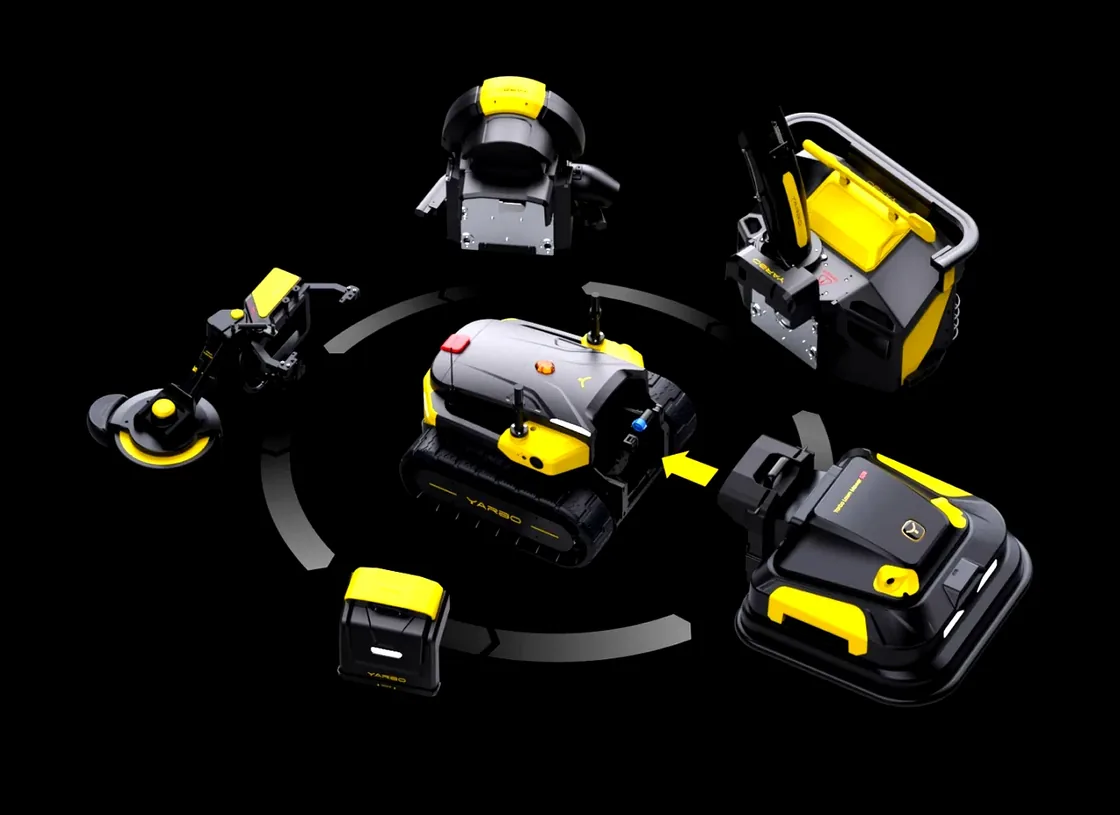
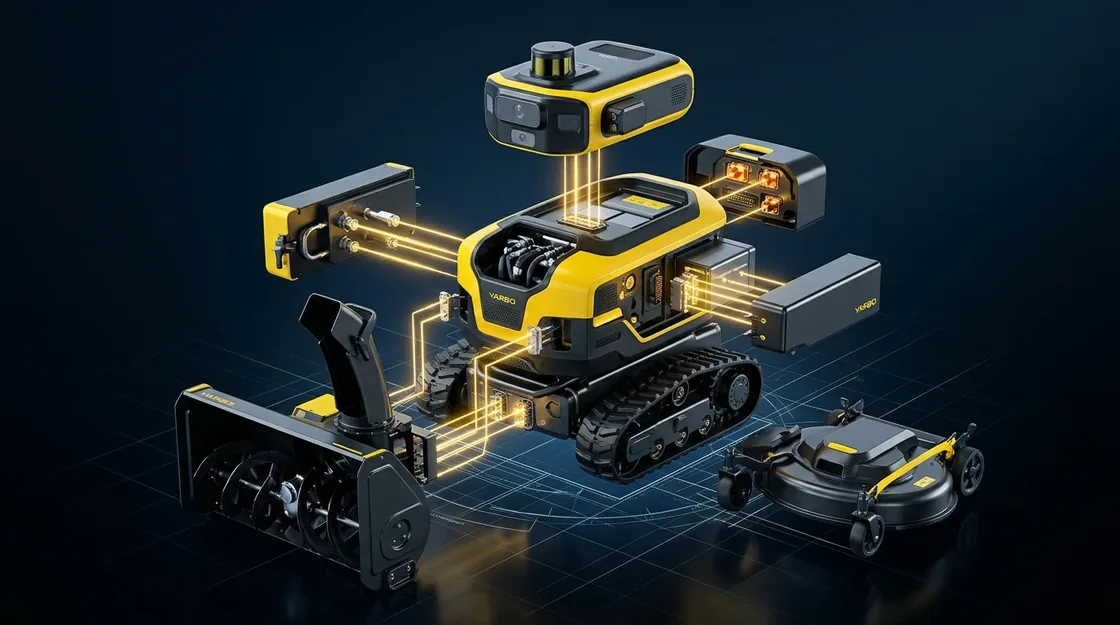
4. Hardware Attachment Bus & Edge Sensor Specifications
| Domain | Interface & Protocol | Capability / SDK Entry | Safety Interlocks |
|---|---|---|---|
| Head Actuator & Mount | Linear push-rod (0–64 position feedback), quick-release mechanical flange | head_up / head_down / head_stop |
Over-current protection, hardwired E-Stop cutoff |
| Tool Motor Drives | snow_roller (850–1800), leaf_blower (1000–2000), mower_blades & height (0–100) |
robot.run_module() / set_mower_height() |
Pre-checks head_type & body_stop_button_state == 0; auto stop frame on exit |
| Vision & Localization | Stereo RGB snapshot, centimeter RTK, fused wheel/IMU odometry (CombinedOdom) |
sensor.read / telemetry.read |
Local gateway rate limit (120/min), explicit privacy consent |
| On-Robot Edge Sandbox | Linux container / WASM + Unix socket gateway (/tmp/yarbo-rt10/plugin.sock) |
runtime: "car" |
0.25 vCPU / 256MB limit, read-only rootfs, isolated from real-time MCU |
4.5 Hardware Development Kit (HDK v1.0 · CAD / Pinout / CANopen & Ethernet)
HDK v1.0 provides mechanical and electrical reference specifications derived from the production Yarbo Mainboard V1.0.9 and quick-swap attachment interface so universities, robotics labs, and OEM partners can prototype custom heads cleanly:
- 3D Mechanical Flange STEP Model:
yarbo-quick-swap-flange-v1.0.step(ISO 10303-21 AP214, 240×160×48 mm, 4× Ø12.0 H7 latch bores at 190×110 mm pitch, 8× M8 bolt pattern at 210×136 mm, top Z=+36 mm Ø10.2 mm push-rod clevis bracket for 0–64 mm stroke, recessed J4/J19 blind-mate pockets). - Electrical & Signal Pinout Vector Diagram:
yarbo-hdk-v1.0-pinout.svg?v=20261118a(J4 LCB30PB-M2P 26–42V/40A switched rail +J19 HY2.0-12P12P composite signal connector). - CANopen Protocol Spec & DBC:
yarbo-canopen-hdk-v1.0.json·yarbo-canopen-hdk-v1.0.dbc(1 Mbps standard 8-byte frames, ready for SavvyCAN, PCAN-View, andcantools).

| Connector / Frame | Pins / Channel | Electrical & Signal Specs | Protocol & Safety Interlock |
|---|---|---|---|
J4 Power RailLCB30PB-M (2P) |
Pin 1: VOUT_HEAD+Pin 2: PGND |
26V–42V DC (battery rail), 40A continuous / 60A peak (2s) | Switched via U27 LM5069MM-2 hot-swap controller & high-side MOSFETs; hardwired E-Stop cuts power in < 2 ms |
J19 Signal BusHY2.0-12P (12P) |
Pin 1–4: 100BASE-TX + PoEPin 5–6: CAN_H / CAN_LPin 7–8: PPS+ / PPS-Pin 9–10: TERM+ / TERM-Pin 11–12: HEAD_DET / ISO_SGND |
100M Ethernet + 12V PoE + CA-IS3050G isolated 1 Mbps CAN + RS422 PPS + 120Ω termination + presence sense |
Enable 120Ω termination on end-of-bus attachments via software-controlled TERM+/TERM- |
CANopen SDO0x600+ID / 0x580+ID |
Custom 3P NodeIDs:0x10..0x1F |
8-byte standard frame: [cmd, idx_lo, idx_hi, sub, d0, d1, d2, d3] |
Isolated from official chassis and head NodeIDs (0x01..0x0F) |
CANopen TPDO0x180+ID .. 0x480+ID |
0x180+ID RPM/Current/Rod0x280+ID Rails/Temp |
10 Hz–50 Hz periodic telemetry (little-endian uint16/int16) |
Chassis broadcast 0x68C Bit 32 is the E-Stop flag: attachments must halt within 50 ms when set to 1 |
5. GPS-Denied Garage Automation: Closed-Loop Odometry Drive
For indoor or covered garages without RTK/GPS reception, robot.undock() and robot.drive_odom() provide bounded closed-loop short-range navigation over fused wheel/IMU odometry:
from yarbo_sdk import YarboAccount

with YarboAccount(environment="prod") as account:
    account.login(email, password)
    robot = account.robot(device_id)

    # 1. Undock from indoor charging pad
    robot.undock(timeout=10)

    # 2. Closed-loop 6.0 m exit along initial heading (200 ms cmd_vel + 1 s safety watchdog)
    res = robot.drive_odom(
        distance_m=6.0,
        speed_m_s=0.2,
        tolerance_m=0.08,
        max_duration_seconds=60,
        odom_stale_seconds=1.5,
    )
    print(res.termination, res.distance_travelled)
Safety bounds: single move ≤ 10 m, speed ≤ 0.4 m/s. Arrival within tolerance, cancellation, timeout, stale odometry, non-zero error_code, or any E-Stop/bumper trigger halts motion immediately and transmits a zero-velocity stop frame.
6. Core REST & MQTT Endpoints
REST Base URL: https://authz.yarbo.ai · MQTT TLS Port: 8883.
| Method | Path | Description |
|---|---|---|
| POST | /apply | Self-service Console registration; returns one-time sandbox client_id / client_secret |
| POST | /portal/request-production | Submit production quota & scope upgrade request after sandbox validation |
| POST | /portal/status | Inspect application status, tier (sandbox / production), and active rate quota |
| POST | /oauth/device_authorization | Start OAuth 2.0 Device Flow (supports optional plugin_id and granular scope) |
| POST | /oauth/token | Exchange device code for tokens or rotate single-use refresh_token |
| POST | /oauth/broker-token | Issue short-lived (3600s) scoped MQTT TLS credentials for an authorized robot |
| POST | /oauth/revoke | Revoke grant immediately and disconnect active MQTT sessions within 1–2s |
| POST / GET | /commands · /commands/{id} | Send guarded hardware commands (with confirm: true & idempotency_key) and inspect receipts |
| POST | /requests | Execute whitelisted read queries (get_device_msg, map parameters, plans, schedules) |
| POST | /workflows | Execute 1–5 sequential guarded actions with stop-on-failure semantics |
| GET / POST | /plugins · /plugins/{id}/installations | Browse verified plugins and deploy to cloud (Fargate) or car (On-Robot Linux Sandbox) |
| POST | /dev/plugins/submit | Submit plugin source & manifest for automated S0–S4 security audit and S5 review |
7. Self-Service Onboarding Walkthrough
Use the Developer Console to generate sandbox credentials, validate OAuth 2.0 Device Flow against an authorized robot, and upgrade to production quotas:

- Create Sandbox Credentials: Open Console → 1. Get Sandbox Credentials, describe your integration use case, and save the one-time
client_secret(10 req/min sandbox tier). - Authorize Test Robot: Initiate
POST /oauth/device_authorizationand approve theuser_codeon/deviceusing the robot owner’s Yarbo account. - Validate Telemetry & Guarded Calls: Exchange a short-lived broker ticket via
POST /oauth/broker-token, verify readback-safe map/schedule previews, and test error handling. - Upgrade to Production: Submit Console → 2. Request Production Access with your validation notes; once approved, your client upgrades to
production(60 req/min).
8. Python SDK Daily Resource Examples
from yarbo_sdk import YarboAccount, ScheduleTiming

with YarboAccount(environment="prod") as account:
    account.login(email, password)
    robot = account.robot(device_id)

    # 1. One-shot telemetry snapshot & hardware capability check
    snap = robot.status()
    cap_report = robot.read_capabilities()

    # 2. Read yard maps & update zone attributes with baseline + readback verification
    maps = robot.maps.read()
    res_map = robot.maps.update("area", area_id, {"name": "Front Lawn"})

    # 3. Rename a work plan & configure timezone-explicit recurring schedule
    res_plan = robot.plans.rename(plan_id, "Weekend Perimeter Clean")
    timing = ScheduleTiming.local(
        "08:30", "10:00",
        week_day=0b0111110,
        zone="America/New_York",
        start_date="2026-11-05",
        end_date="2026-11-05",
    )
    res_sched = robot.schedules.set_timing(schedule_id, timing)
9. Error Codes & Rate Limits
| Error Code | Meaning | Recommended Handling |
|---|---|---|
authorization_pending | Robot owner has not approved the consent screen yet | Continue polling at the returned interval |
access_denied | Owner declined consent or target robot is outside grant scope | Stop polling and prompt the user to review device grants |
invalid_scope | Client or token lacks required scope (e.g., control:state) | Request a new authorization grant including the needed scope |
confirmation_required | Actuation call omitted "confirm": true | Obtain explicit user confirmation and pass confirm: true |
commands_disabled | Platform-wide safety kill switch is active | Pause actuation requests until service status clears |
invalid_grant | Grant revoked by owner, refresh token expired, or replay detected | Purge stored tokens immediately and do not auto-reconnect |
quota_exceeded (429) | Rate limit exceeded (Sandbox 10/min, Prod 60/min, Commands 5/min/robot) | Back off exponentially before retrying |
10. Cloud & On-Robot Plugin Submission & Local Route Control
Each plugin bundle declares a manifest.json and entry script (plugin.py) targeting either AWS Fargate (cloud) or the isolated On-Robot Linux Sandbox (car):
{
  "id": "yarbo.route-control",
  "version": "0.1.0",
  "name": "Car Route Controller",
  "description": "Closed-loop local waypoint route tracking via on-robot capability gateway",
  "runtime": "python3.11",
  "entry": "plugin.py",
  "capabilities": ["telemetry.read", "control.motion"]
}
- Self-Service Submission (Automated S0–S4 Audit): Submit your credentials, manifest fields, and
plugin.pyon Plugins (or viaPOST /dev/plugins/submit). The service packages, SHA-256 signs, and runs S0–S4 static & privilege checks, placing passing builds inpending_review. - S5 Marketplace Approval: Once approved in Admin, the plugin transitions to
activein the marketplace catalog. - One-Click Robot Deployment: Deploy to an authorized robot SN with runtime
car; the on-robot agent verifies the signature and starts the sandbox container (requested → installing → active).
On-robot containers run without public internet access and invoke bounded motion methods over the local Unix socket gateway (POST http://localhost/v1/gateway/invoke → /tmp/yarbo-rt10/plugin.sock, capped at 300 calls/min):
drive_route: Local-frame waypoint pure-pursuit tracking, e.g.{"waypoints": [[0.0, 0.0], [1.5, 0.0], [1.5, 1.0]], "speed_m_s": 0.2, "lookahead_m": 0.4, "tolerance_m": 0.1}(2–64 waypoints within±50 m, speed0.05..0.4 m/s).drive_vel: Single bounded velocity step, e.g.{"linear_m_s": 0.2, "angular_rad_s": 0.0, "duration_ms": 200}(|v| ≤ 0.4 m/s,|ω| ≤ 0.5 rad/s,1..5000 ms).stop: Immediate zero-velocity halt{"linear_m_s": 0.0, "angular_rad_s": 0.0}.
11. Release Changelog
| Version | Date | Highlights |
|---|---|---|
0.2.0a18Latest |
2026-11-04 |
Yarbo MCP Server (yarbo-mcp) & Live Indoor Odom Calibration: Zero-dependency Model Context Protocol server over stdio exposing 13 tools (6 read-only inspection, 4 readback-verified config edits, 3 bounded actuation tools), guarded by confirm=True and YARBO_MCP_READ_ONLY=1. Completed Phase 3 live robot calibration for SDK-LOCAL-001 in GPS-denied indoor environments.
|
0.2.0a17 |
2026-11-03 |
SDK-LOCAL-001 Closed-Loop Odometry & HDK v1.0: Added robot.undock(), robot.drive_odom() (200 ms cmd_vel streaming + 1 s telemetry watchdog + zero-velocity stop), and examples/garage_demo.py. Released HDK v1.0 (3D STEP flange model, J4/J19 pinout SVG, CANopen JSON & DBC) and production OAuth 2.0 Device Flow.
|
0.2.0a16 |
2026-10-22 |
Simplified Daily Resource APIs: Added ergonomic facades for robot.status(), robot.maps, robot.plans, robot.schedules, and robot.jobs with offline previews (preview_*) and automatic readback verification.
|
0.2.0a10 |
2026-10-21 |
Bounded Actuation, Map/Plan Codecs & Capability Inspection: Added bounded velocity drive, tool motor control (snow_roller, leaf_blower, mower_blades), cutting deck height (0–100), Rover BLE map packet decoding, offline map compatibility checks, and read_capabilities().
|
0.1.0 |
2026-10-20 |
Initial Read-Only Telemetry SDK (SDK-RO-001): Passive TLS 8883 MqttReader, YarboAccount session management, explicit one-shot get_device_msg queries, and per-field reception timestamps.
|
12. License & Commercial Partnership
SDK source code is provided under the PolyForm Noncommercial License 1.0.0, subject to the Yarbo Data SDK Terms of Use (V1.1). Commercial integrations, dealer fleet operations, and commercial hardware attachments require a separate written license from Yarbo (software@yarbo.com).